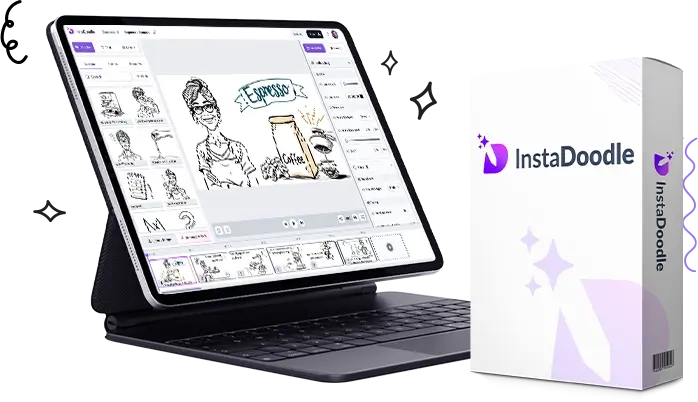
Why So Many Businesses Still Bother With Whiteboard Videos
Video is still one of the best ways to get an idea across online — that part hasn’t changed. What has changed is that not every business has the budget or the patience for a fully animated, studio-quality production.
That’s basically why whiteboard videos never really went away. They lean on storytelling instead of visual effects. You’re not trying to impress anyone with fancy transitions; you’re just walking someone through an idea one step at a time, which happens to be exactly what works when you’re explaining a product or a tricky concept to someone who’s never heard of it.
The Actual Benefits of Using InstaDoodle
1. It cuts down the time video creation usually takes
Normally, putting together an animated video means writing a script, designing or sourcing illustrations, animating every scene, recording a voiceover, then exporting the whole thing. Depending on how picky you are, that can eat up days or drag into weeks.
InstaDoodle shortens a lot of that by handling it in-browser, with assets already built and AI doing some of the heavy lifting. It won’t be instant, but it’s a lot faster than starting from a blank timeline.
This tends to matter most for busy entrepreneurs, marketing teams, agencies juggling multiple clients, freelancers, and small business owners who don’t have hours to spare per video.
2. You don’t need to know anything about design
A lot of animation software assumes you already understand keyframes, timelines, and layers. If you’ve never touched anything like that, it can be genuinely intimidating.
InstaDoodle skips most of that assumption. The drag-and-drop setup means you’re not fighting with the software just to move a shape across the screen. If you’ve never made an animated video in your life, this is going to feel a lot less overwhelming than the traditional stuff.
3. It’s all in the browser, which is more convenient than it sounds
No downloads to babysit, no worrying about whether your laptop can actually handle rendering. You just log in and work from there, which also means you can hop onto a different device if you need to and pick up where you left off.
4. The doodle asset library is genuinely big
This is one of the things that stood out. Instead of buying illustrations separately every time you need a new scene, you’re just pulling from what’s already included. That saves both time and money, especially if you’re making videos often.
People end up using these assets for things like:
- Business presentations
- Marketing videos
- Lessons and educational content
- Product explainers
- Sales videos
- Social clips
- Training material
5. It works across a bunch of different industries, not just one
That’s actually a bit unusual for this kind of software. A few examples of where it fits:
- Digital marketing — product explainers, lead gen videos, landing page content.
- Education — turning a lesson plan into something students actually want to watch.
- Real estate — walking someone through the buying process or showcasing a neighborhood.
- Healthcare — explaining a procedure or a wellness topic in plain terms.
- Finance — making a dense concept feel less like homework.
- E-commerce — showing how a product actually works instead of just describing it in a bullet list.
Where People Are Actually Using This
YouTube creators — especially educational channels that need a way to explain something without sitting in front of a camera the whole time.
Affiliate marketers — a lot of them lean on explainer-style videos to walk viewers through a product and build a bit of trust before sending them to a link.
Local businesses — service-based ones especially, who just need something explaining what they do and why it’s worth paying for.
Coaches and consultants — whether it’s business strategy, fitness, or productivity, turning it into an animated video tends to make it stick better than a slide deck.
Agencies — particularly ones that need to crank out client videos on a recurring basis without burning through their own animator’s time every single week.
How It Actually Performs
From what I can tell, InstaDoodle is clearly optimized for speed and ease over deep, granular animation control — and for most people, that’s the right trade-off. You’re not going to be adjusting individual frames for hours. You just get the message out.
If your goal is a clean, functional explainer video rather than something cinematic, this streamlined approach is probably going to serve you better than a heavier, more complicated tool.
Pros and Cons
What’s good:
- Genuinely beginner-friendly
- No installation, works right in the browser
- AI assistance speeds things up noticeably
- Big library of graphics and assets included
- Works for marketers, educators, agencies, and regular businesses alike
- Good for explainers, presentations, and promo content
- Can save you from outsourcing simple animation jobs
- Flexible enough to cover a lot of different use cases
What’s not so good:
- Whiteboard-style animation is a specific look — it just won’t suit every brand or campaign
- If you want cinematic-level, highly customized animation, dedicated pro software still has more depth
- Like any tool, it won’t fix a bad script or a muddled message — the writing still matters
What Does It Cost?
Pricing has moved around depending on promotions — sometimes there’s a one-time payment offer instead of a subscription, but that kind of thing shifts over time, so don’t take any number here as gospel.
Before you buy, it’s worth double-checking the current sales page for:
- The actual price right now
- What’s included versus what’s an upsell
- Available upgrades
- License terms
- Refund policy
- Any bonuses tied to the current promotion
If you’re planning to make videos regularly, it’s worth comparing whatever the current offer is against what you’d pay monthly for competing tools over a year. That’s usually where the real value shows up.
Is It Actually Worth the Money?
Depends entirely on how much you’ll use it.
Probably worth it if you:
- Make marketing content on a regular basis
- Need explainer videos for your own business
- Run social campaigns that need visual content
- Produce educational material
- Work with clients who need simple animated videos
- Would rather have an easy learning curve than more advanced controls
Probably not worth it if:
You only need one or two videos, ever, and have no ongoing reason to keep using it — at that point, just outsourcing a small project to a freelancer might get you more for your money.
Where I Land on It So Far
Having gone through the features, the intended workflow, and the kinds of people it’s built for, InstaDoodle strikes a decent balance between being simple and actually being useful.
Its biggest strengths are how accessible and fast it is, and the fact that it lets people with zero design background put together something that looks intentional. It’s not trying to replace a full animation studio, and it shouldn’t be judged like one — but for marketers, educators, agencies, and small business owners who just need solid explainer content without a steep learning curve, it does what it sets out to do.
Next up, I’ll stack it against a few other whiteboard animation tools, get into who benefits most, and answer some of the questions people keep asking before deciding whether it’s the right pick for them.